
Step 1: Know the three levels
Vedette compares each new trade mark filing with your brand's words by spelling, sound and shared words, and compares its classes with yours. The level sums up what those tests found:
- High similarity: the names are very close, such as the same name once spelling tricks are read out, one letter apart or two neighbouring letters swapped in a longer name, or the same sound, in one of your classes or a related one. In an unrelated class, only the same name or a one-letter difference is High.
- Medium similarity: the names are close in part, such as a shared distinctive word, the same start, or your name inside a longer one, usually in one of your classes.
- Low similarity: the names are a little alike, or close but in another industry.
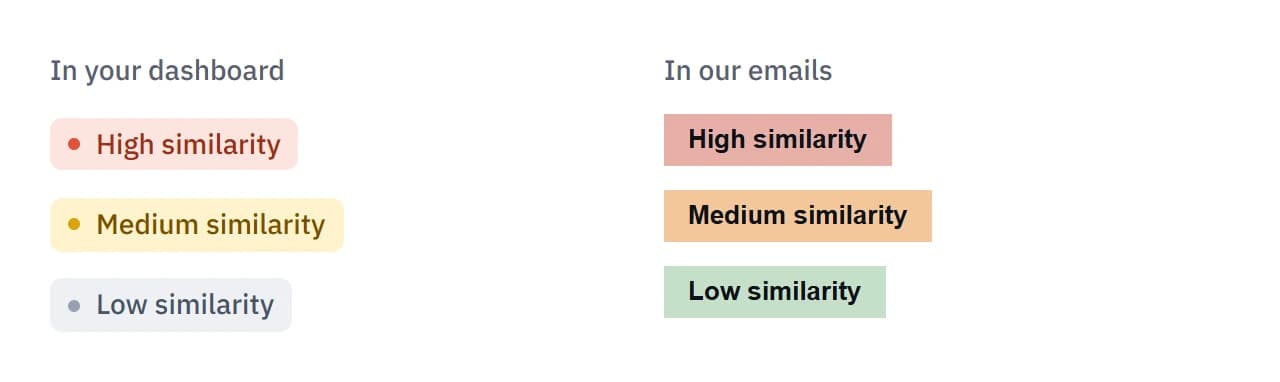
The dashboard and the emails use different colours for the same three levels. In your dashboard, High is solid dark orange, Medium has an amber outline and Low is grey. Our emails show High in soft red, Medium in orange and Low in green. A High match is High in both places.
Classes matter as much as the words. Our guide on the same name in a different class explains how IP Australia's examiners look at related goods and services.
Step 2: Read "Why it matched"
Each match on the Matches page is a card with the filing's name, its level, its classes, its filing date and a short line saying why it matched. A match's own page has the same line under "Why it matched".
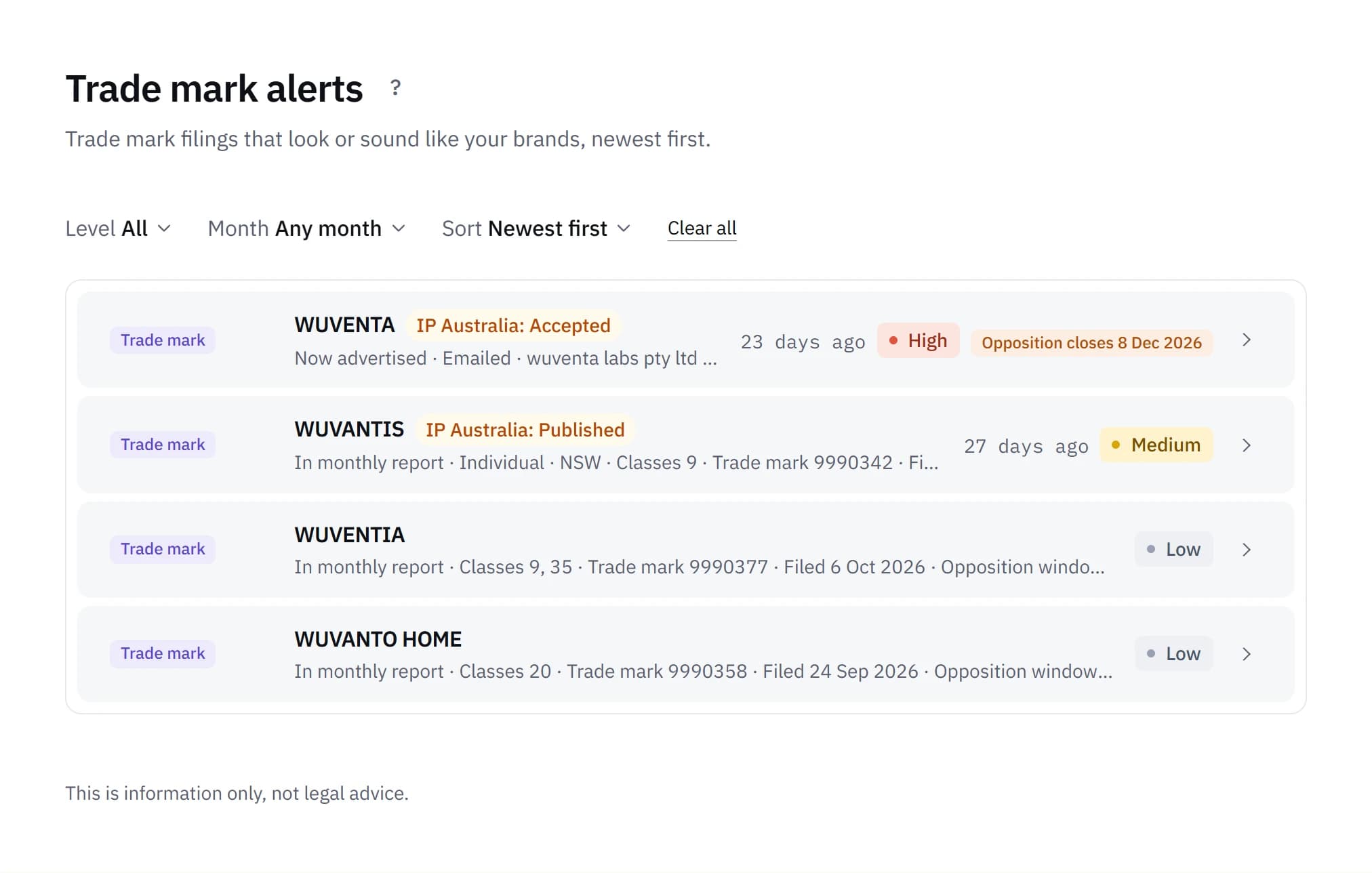
The line names the test that matched. These are some of them:
- "Same name as your mark WUVANTA."
- "Sounds like your mark WUVANTA."
- "Spelt like your mark WUVANTA."
- "Starts like your mark WUVANTA."
- "Contains your mark WUVANTA."
When the filing is in a class outside your industries and related ones, the line ends with "in another industry." A Low match that only just passed has "Spelt a little like your mark WUVANTA."
The tags on a card say how it reached you: "Emailed", "In monthly report", "First check" or "Now advertised". "New" marks a match you haven't opened since it appeared, and the number beside Alerts in the menu counts unread alerts.
Step 3: Know how each match reaches you
| Level | How it reaches you |
|---|---|
| High similarity | Reviewed by a person at Vedette, then emailed to you on its own |
| Medium similarity | Listed and included in your monthly report, or emailed on its own if the window to oppose closes within 45 days. A person at Vedette reviews it before that email. |
| Low similarity | Listed in Matches and your monthly report, never emailed on its own |
Business and company names from ASIC's registers are checked each week. A new High name is reviewed by a person and then emailed. A Medium name is listed without review and is in your monthly report. A name rated Low isn't listed.
Domain matches from a brand's first check are listed straight away and aren't emailed. Later ones are rated High, Medium or Low, and only High ones are emailed, once reviewed.
The monthly report arrives on the 1st and can be turned off in Settings. With it off, a High match is still emailed once it's reviewed, and a Medium one whose window to oppose closes within 45 days is still emailed on its own.
Step 4: Know what "First check" means
When you add a brand, or change its words or classes, Vedette checks it once against filings from the previous 24 months, and older ones whose last day to oppose hasn't passed. What it finds is listed on the brand's Matches tab straight away at its level, tagged "Found in first check". These results are listed by our software without being reviewed by a person, and they're never emailed, because they aren't new filings.
The same first check covers business and company names already on ASIC's registers. "Already on the register", at the foot of a brand's Matches tab, lists close trade marks from the whole register, older ones included.
Step 5: Use Set aside and "This is mine"
The Matches page filters by level: All, High, Medium, Low and Set aside. "All" leaves out what's been set aside. Set aside lists filings a person at Vedette looked at and chose not to show as a match, usually because the names are further apart than our software first rated them. Setting a filing aside isn't a view on whether it matters to you, and you can open any of them. They're kept so the list is complete, and they aren't emailed.
Business and company names have their own tab. If one of them is yours, choose "This is mine". The notice says the name "is now one of your names. We won't show it as a match.", and "Undo" puts it back.
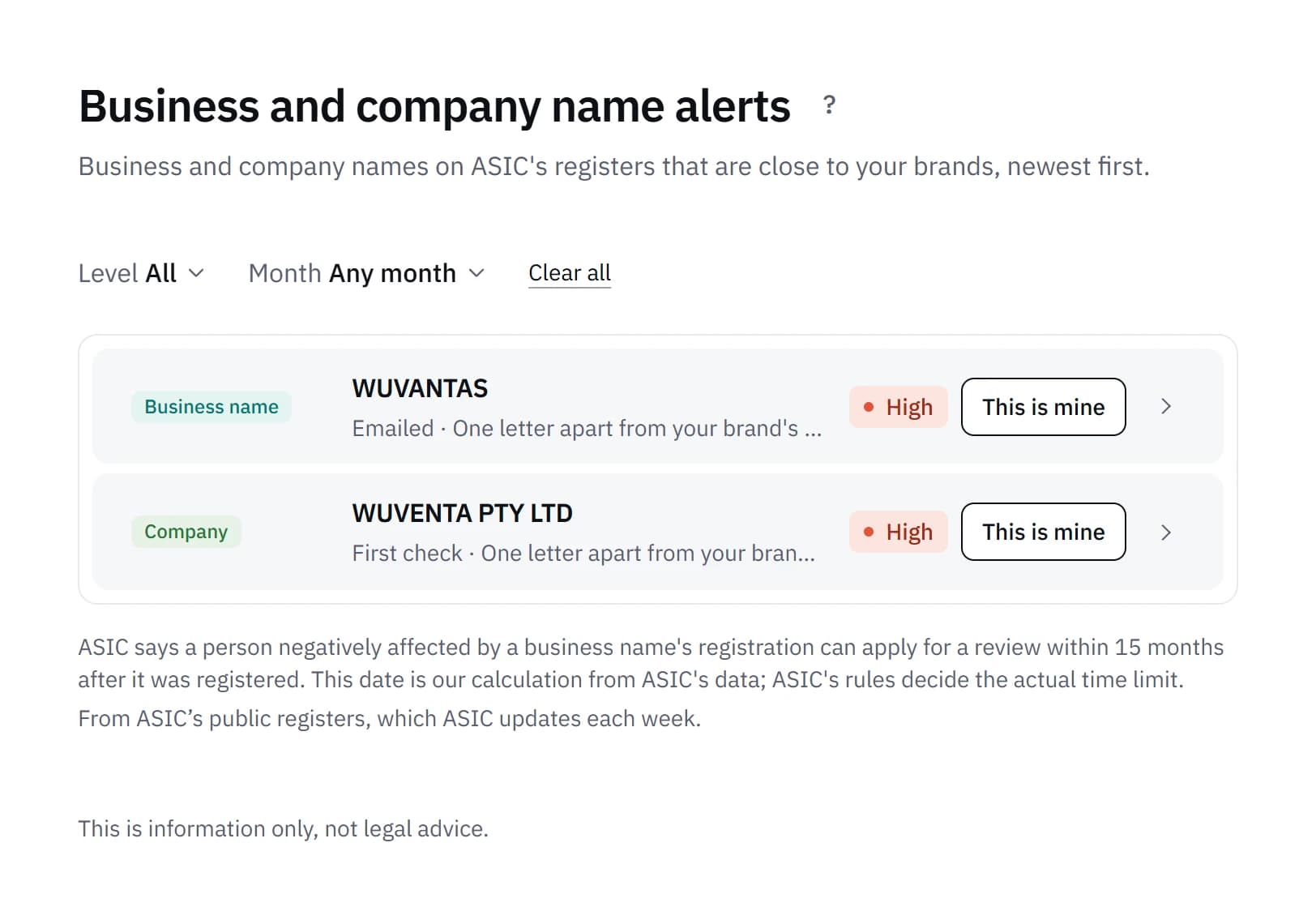
To leave your own names out from the start, add your ABN in Settings, under Business details. We then leave out business and company names held under it.
Step 6: Check the window to oppose
A trade mark match shows its opposition window: "Not advertised yet", "Open" with the days left, or "Closed". IP Australia's page on challenging someone else's IP says a notice of intention to oppose is filed within two months of the acceptance being advertised. The match's own page gives the closing date and the advertisement date it's counted from.
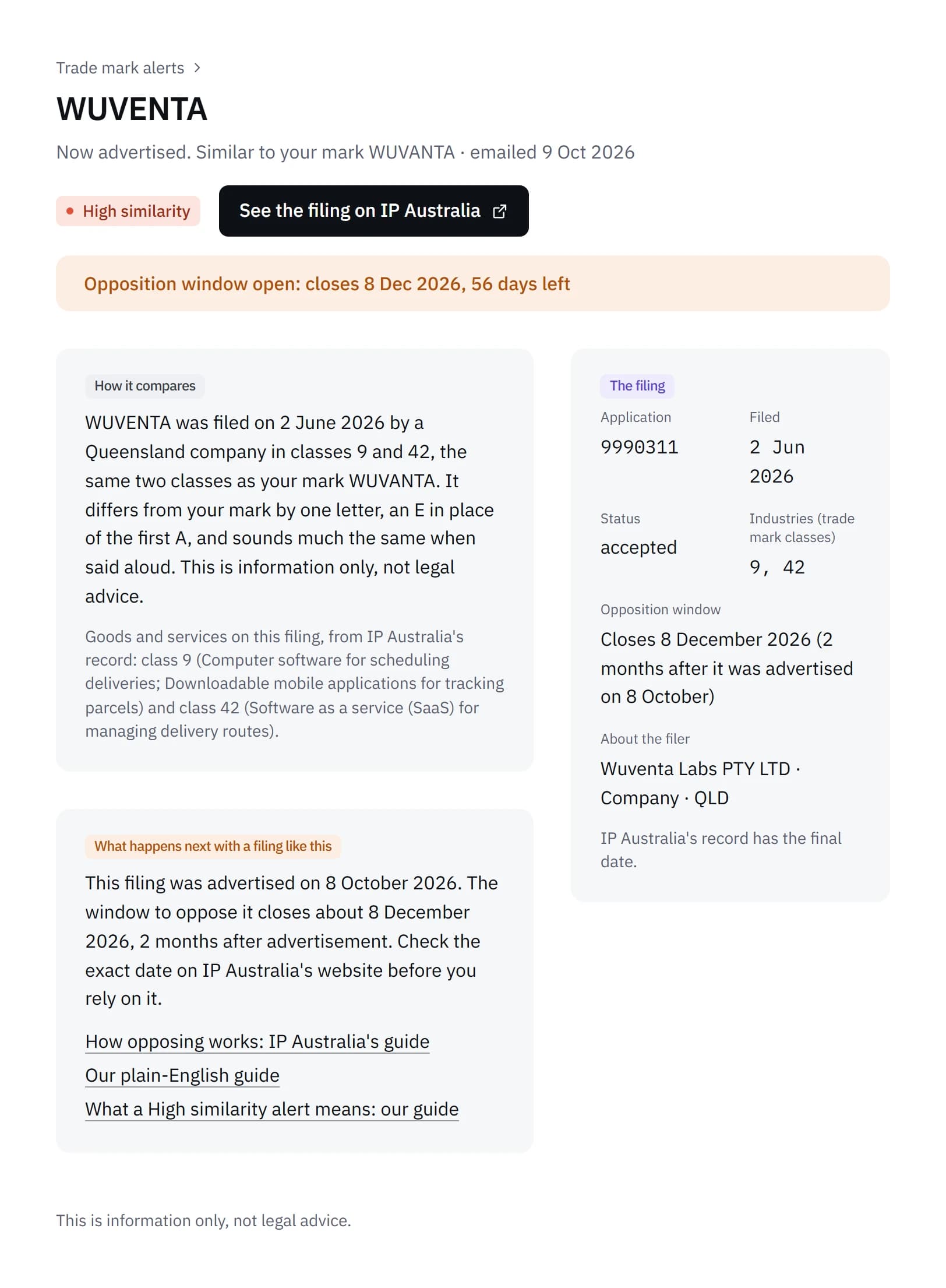
These dates are our calculation. As our terms put it, any date in an alert, including the last day to oppose, is our calculation from the register data available at the time. Deadlines can change or be extended, and IP Australia's records and the law decide the actual deadline. Check any deadline on IP Australia's website before you rely on it. The page itself says "IP Australia's record has the final date."
For a business name, the date shown is 15 months after it was registered: our calculation of when the time to ask ASIC for a review ends. ASIC's page on asking for a review of a business name registration sets out that time limit, and our guide on someone registering a business name like yours has its steps.
What you do about a match is your decision. Our guide on what to do when you get a High similarity alert goes through the options and their time limits, and how to oppose a trade mark covers each step of an opposition.
Common questions
Does a High match mean anything has to be done?
No. The level describes how alike two names are and how their classes relate. It says nothing about why a name was chosen, or what will happen to the filing.
Why is a match Low when the names look close?
Usually because the filing is in a class outside your industries and the ones related to them. Outside those, only the same name or a one-letter difference rates High.
Why wasn't a Medium match emailed straight away?
Medium matches are gathered into the monthly report. One is emailed on its own only when its window to oppose closes within 45 days.
Are first check results ever emailed?
No. They're listed on the brand's Matches tab straight away and tagged "Found in first check", but they aren't new filings, so they aren't emailed.
Sources
- How to challenge someone else's IP (IP Australia)
- Ask for a review of a decision about a business name registration (ASIC)
- Trade mark timeframes and fees (IP Australia)
What Vedette does is described as it worked on 17 October 2026.